Electronic ballasts have become the standard power control solution for fluorescent lamps, UV lamps, germicidal lighting systems, and many industrial lighting applications. Compared to traditional magnetic ballasts, electronic ballasts offer higher efficiency, quieter performance, reduced flickering, and lower energy consumption. However, after years of continuous operation, heat buildup, voltage fluctuations, and component aging can cause failures inside the ballast circuit board.
One of the most common and frustrating problems technicians encounter is component burnout. Burned resistors, exploded capacitors, damaged MOSFETs, or charred PCB traces can render an electronic ballast completely inoperative. Fortunately, many of these failures can be repaired if the damage is accurately diagnosed and the correct replacement and re-soldering procedures are followed.
This guide explains the causes of ballast circuit board failures, how to identify damaged components, the tools required for repair, and the best practices for replacing and re-soldering burned electronic parts.
Understanding How an Electronic Ballast Works
Before attempting repairs, it helps to understand the basic operating principle of an electronic ballast.
Unlike older magnetic ballasts that rely on heavy transformers, electronic ballasts convert standard AC input into high-frequency electrical output. The circuit generally consists of several functional sections:
-
Input EMI filter.
-
Rectifier bridge.
-
Smoothing capacitor.
-
Power factor correction (PFC) stage (in many modern models).
-
Oscillator and switching transistors.
-
High-frequency transformer or resonant network.
-
Output stage supplying the lamp.
Because these circuits operate at relatively high frequencies and temperatures, even minor component degradation can eventually lead to catastrophic failure.
Why Electronic Ballast Components Burn Out
Component burnout rarely occurs without an underlying cause. Simply replacing a damaged part without understanding why it failed often leads to repeated breakdowns.
Excessive Heat
Heat is the number one enemy of electronic ballasts. Poor ventilation, enclosed fixtures, and high ambient temperatures gradually weaken solder joints and accelerate capacitor aging. Overheated MOSFETs and resistors may eventually fail completely.
Voltage Surges
Power grid instability, lightning strikes, or switching surges can expose sensitive semiconductor devices to voltage spikes beyond their ratings. Bridge rectifiers, transistors, and integrated circuits are particularly vulnerable.
Capacitor Aging
Electrolytic capacitors naturally degrade over time. As their equivalent series resistance (ESR) increases, heat generation rises, placing additional stress on neighboring components and often triggering chain-reaction failures.
Lamp or Load Abnormalities
A defective UV lamp or fluorescent tube may force the ballast to operate outside its designed range. Extended operation under overload conditions can overheat switching components.
Moisture and Contamination
Dust, humidity, and chemical contaminants can create leakage currents across the PCB surface. Corrosion eventually damages conductive paths and weakens solder joints.
Common Burned Components Found in Electronic Ballasts
When opening a failed ballast, technicians often encounter visible signs of damage. The following components are among the most frequently affected.
Electrolytic Capacitors
Signs of failure include:
-
Bulging top vents.
-
Leaking electrolyte.
-
Swollen casing.
-
Burn marks around the base.
Failed capacitors often cause unstable output voltage and startup problems.
Power MOSFETs or Switching Transistors
These devices handle high-frequency switching and can fail due to overheating or electrical overstress. Burned MOSFETs may exhibit:
-
Cracked packaging.
-
Melted epoxy.
-
Short circuits between terminals.
Power Resistors
High-wattage resistors may discolor or crack after prolonged overload conditions. Sometimes the printed value becomes unreadable due to burning.
Bridge Rectifiers
A failed bridge rectifier may display burn spots or cracked housing and often results in complete loss of power.
Inductors and Transformers
Although less common, overheating can damage winding insulation, leading to shorts or open circuits.
Printed Circuit Board Traces
Excessive current can vaporize copper traces, leaving blackened or broken pathways that require repair before the ballast can function again.
Essential Tools for Ballast Circuit Board Repair
Professional results depend on using the right equipment.
A typical repair workstation should include:
-
Temperature-controlled soldering station.
-
Hot air rework station.
-
Desoldering pump or vacuum gun.
-
Solder wick (desoldering braid).
-
High-quality lead-free or tin-lead solder.
-
Flux pen or liquid flux.
-
Digital multimeter.
-
ESR meter for capacitor testing.
-
Component tester for transistors and MOSFETs.
-
Magnifying lamp or microscope.
-
Fine-tip tweezers.
-
Isopropyl alcohol and cleaning brushes.
-
PCB repair wire for damaged traces.
Investing in proper tools not only improves repair quality but also reduces the risk of additional board damage.
Safety Precautions Before Repair
Electronic ballasts can retain dangerous voltages even after they are unplugged.
Always observe these precautions:
-
Disconnect power completely.
-
Discharge large electrolytic capacitors before touching the circuit.
-
Wear safety glasses when soldering.
-
Use ESD protection when handling semiconductors.
-
Work in a well-ventilated area to avoid inhaling solder fumes.
-
Never power-test an exposed ballast without appropriate insulation and isolation equipment.
Ignoring these precautions can result in electric shock or further damage to the circuit.
Step 1: Visual Inspection of the Circuit Board
The first step in any ballast repair is a thorough visual examination.
Look for:
-
Burned or blackened areas.
-
Cracked solder joints.
-
Lifted PCB pads.
-
Blown components.
-
Corrosion around terminals.
-
Broken copper traces.
-
Loose connectors.
Using magnification often reveals hairline cracks that are invisible to the naked eye.
Photographing the board before disassembly can also help ensure proper component orientation during reassembly.
Step 2: Identifying Burned Components
Sometimes the failed component is obvious. In other cases, the damage may be subtle.
Using a Multimeter
Check for:
-
Shorted MOSFET drain-source connections.
-
Open resistors.
-
Diode forward voltage.
-
Bridge rectifier continuity.
Testing Capacitors
An ESR meter provides a much more accurate assessment than simple capacitance measurement. Capacitors with elevated ESR should be replaced even if they still meet nominal capacitance values.
Checking PCB Traces
Use continuity mode to verify that burned copper paths are still electrically connected.
Remember that a visibly damaged component may not be the original cause of failure. Always test surrounding components before replacing anything.
Step 3: Removing Burned Components
Desoldering must be done carefully to avoid lifting PCB pads.
Through-Hole Components
-
Apply fresh flux.
-
Heat the solder joint evenly.
-
Use a desoldering pump or solder wick.
-
Gently remove the component without excessive force.
Surface-Mount Components
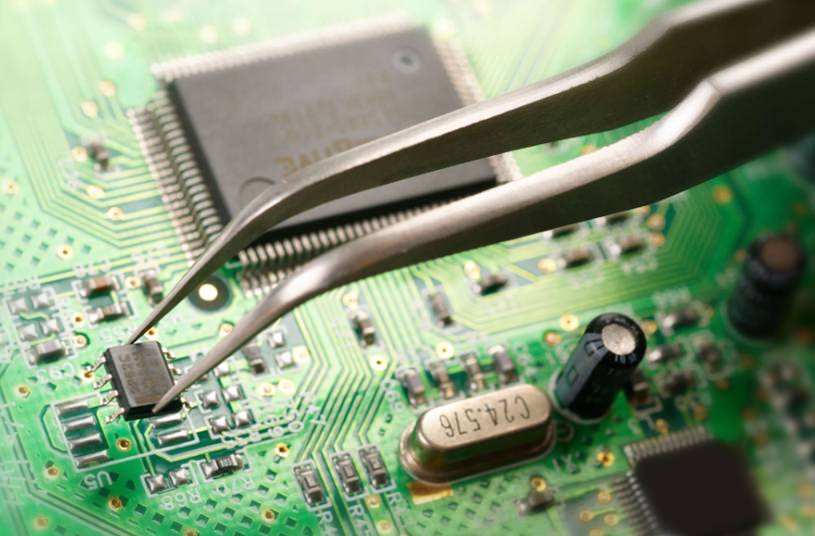
Use a hot air rework station with moderate airflow. Heat both terminals evenly until the solder softens, then lift the component with tweezers.
Avoid overheating the board, as excessive heat can delaminate PCB layers.
Choosing the Correct Replacement Components
Selecting the proper replacement is critical for long-term reliability.
Match Electrical Specifications
The replacement component should meet or exceed the original ratings for:
-
Voltage.
-
Current.
-
Power dissipation.
-
Temperature tolerance.
-
Frequency characteristics.
Use Quality Components
Low-cost counterfeit parts are a common source of repeat failures. Purchase components from reputable electronic distributors whenever possible.
Capacitor Selection
For electronic ballasts, always choose:
-
Low ESR capacitors.
-
High-temperature ratings (105°C preferred).
-
Equal or higher voltage ratings.
MOSFET Replacement
When replacing switching transistors, ensure that switching speed and gate charge characteristics are compatible with the original circuit design.
PCB Trace Repair Techniques
Burned copper traces are common after catastrophic failures.
Minor Trace Damage
If only a small section is damaged:
-
Remove carbonized material.
-
Clean the area thoroughly.
-
Tin the remaining copper.
-
Bridge the gap with solder.
Severe Trace Damage
For larger breaks:
-
Scrape the solder mask to expose fresh copper.
-
Solder insulated jumper wire between intact sections.
-
Secure the wire with epoxy or UV-curable adhesive to prevent movement.
Never leave carbonized PCB material beneath repaired areas, as it can become electrically conductive over time.
Re-Soldering Best Practices
Poor soldering technique is responsible for many repeat ballast failures.
Clean Before Soldering
Always remove oxidation and contamination using isopropyl alcohol and flux.
Apply the Correct Temperature
A soldering iron temperature between 650°F and 720°F (340°C–380°C) works well for most ballast repairs. Excessive heat damages pads and components.
Use Adequate Flux
Flux improves solder flow and minimizes cold joints. Liquid no-clean flux is especially useful for fine-pitch components.
Achieve Proper Wetting
A good solder joint should appear smooth, shiny, and slightly concave. Dull or grainy surfaces may indicate cold solder joints.
Avoid Excess Solder
Too much solder can create bridges between adjacent pads, causing shorts that are difficult to detect visually.
How to Repair Lifted Pads and Damaged Solder Lands
Burned components sometimes pull the copper pad away from the PCB during removal.
If the pad is only partially lifted:
-
Reattach it with high-temperature epoxy.
-
Allow the adhesive to cure fully before soldering.
If the pad is completely missing:
-
Use a small jumper wire to recreate the connection.
-
Anchor the wire securely to prevent vibration-induced fatigue.
Proper mechanical support is just as important as electrical continuity.
Inspecting Your Repair Work
Before reconnecting power, inspect every repaired area carefully.
Checklist:
-
Correct component orientation.
-
No solder bridges.
-
No loose solder balls.
-
Secure jumper wires.
-
Cleaned flux residue.
-
Restored trace continuity.
-
No unconnected pads.
A magnifier or digital microscope can dramatically improve inspection accuracy.
Power-Up Testing After Repair
Never apply full power immediately after major repairs.
Initial Resistance Check
Measure resistance across the input terminals. An unusually low reading may indicate a remaining short circuit.
Current-Limited Startup
Use a current-limiting device or series incandescent bulb tester to reduce the risk of catastrophic failure if hidden problems remain.
Functional Testing
Observe:
-
Stable startup.
-
Proper lamp ignition.
-
Absence of unusual noise.
-
Normal operating temperature.
-
No visible arcing or smoke.
Allow the ballast to run for at least 30 to 60 minutes while monitoring thermal performance.
Common Mistakes to Avoid During Ballast Repair
Even experienced technicians occasionally make avoidable errors.
Replacing Only the Obviously Burned Part
A failed MOSFET may have been caused by a degraded capacitor or damaged driver circuit. Always inspect the entire power stage.
Ignoring Heat Damage
PCB material weakened by excessive heat may become brittle or conductive.
Installing Incorrect Component Values
Substituting a resistor or capacitor with an incorrect rating can alter oscillator frequency and destabilize the circuit.
Poor Solder Joint Quality
Cold joints may function temporarily but often fail after thermal cycling.
Neglecting Cleaning
Flux residues and carbon contamination can lead to leakage currents and long-term reliability issues.
Preventing Future Electronic Ballast Failures
Repairing the ballast is only part of the solution. Preventive maintenance reduces the likelihood of repeat breakdowns.
Improve Ventilation
Ensure adequate airflow around lighting fixtures and ballast enclosures.
Replace Aging Capacitors Proactively
Many technicians replace all electrolytic capacitors during major repairs rather than waiting for additional failures.
Use Surge Protection
Installing surge suppressors helps protect sensitive ballast electronics from transient overvoltages.
Inspect Solder Joints Periodically
Thermal expansion and contraction gradually weaken solder connections, especially around heavy components.
Keep the Circuit Board Clean
Remove accumulated dust and contaminants during routine maintenance to minimize heat retention and electrical leakage.
When Is It Better to Replace the Entire Ballast?
Not every failed ballast is worth repairing.
Replacement may be more practical when:
-
Multiple PCB layers are damaged.
-
The transformer winding has failed.
-
Extensive carbonization affects structural integrity.
-
Proprietary integrated circuits are unavailable.
-
Repair costs approach the price of a new ballast.
For commercial facilities with critical uptime requirements, replacing severely damaged units often provides the best long-term value.
The Value of Skilled Re-Soldering and Component Replacement
Electronic ballast repair is both a technical skill and an exercise in careful diagnosis. While burned components are often the most visible symptom, successful repair requires identifying the root cause, selecting high-quality replacement parts, restoring damaged PCB traces, and producing durable solder joints that can withstand years of thermal cycling.
Technicians who master proper desoldering, component replacement, and re-soldering techniques can recover many ballast circuit boards that would otherwise be discarded. This not only reduces equipment replacement costs but also minimizes electronic waste and extends the service life of industrial lighting systems.
As electronic lighting technology continues to evolve, the ability to repair and restore ballast circuit boards remains an increasingly valuable maintenance skill. A methodical approach, attention to detail, and commitment to quality workmanship are the keys to turning a seemingly destroyed ballast back into a reliable, fully functional power control unit.